FILMOMAT SmartConvert Software
Tax included. Shipping calculated at checkout
Shipping time within Germany: 1 working day
Negative conversion made easy.
For color, black and white, negatives, and slides.
- Standalone tool – no additional software required.
- No subscription. Buy once, use unlimited. Updates included.
- Full user license (Windows 8 or newer, macOS 11 or newer)
After purchase, you will receive a download link for the software and a separate email with your personal license key for activation.
By purchasing the software, you agree that we may transmit your data (email address) to the manufacturer for the activation of your user license.
This is a single-user license. You may use the license on up to 4 personal devices. Sharing the license with other users is prohibited.
Feel free to test the software in the demo version before ordering.
Workflow
Inspired by the efficiency of industrial film scanners like the Fuji Frontier, SmartConvert is designed for simplicity and performance. Effortlessly transform your (DSLR) scanned negatives into stunning positives.
Clever keyboard shortcuts and the absence of unnecessary frills enable a fast workflow.
SmartConvert focuses on the essentials, offering a seamless experience that mirrors the precision of professional film scanning.
Our tip: The Smart Convert Control Panel
Almost all SmartConvert functions can be adjusted via convenient keyboard shortcuts. This significantly increases the efficiency of your workflow and allows you to quickly process a large number of images in the shortest possible time. In addition, we have developed the SmartConvert Control Panel, a hardware keyboard specially designed for SmartConvert. This allows you to control all SmartConvert functions via a physical keyboard – just like with a professional film scanner!
Features
The Algorithm
SmartConvert processes all common RAW file types and TIFF images – in color and black and white.
The processing algorithm is designed to preserve the essence of the film and avoid any artificial image manipulation.
No LUTs, no effects, no attempt to emulate a specific "look."
Simply a powerful tool for easy and quick conversion of your negatives (or slides).
Hot Folder Feature
Specify a hot folder, and all images stored in it will be automatically imported into SmartConvert. Use this function to connect a camera directly to SmartConvert! Simply use a tethering software of your choice to transfer images from the camera to the hot folder.
Auto-Crop
No more manual cropping!
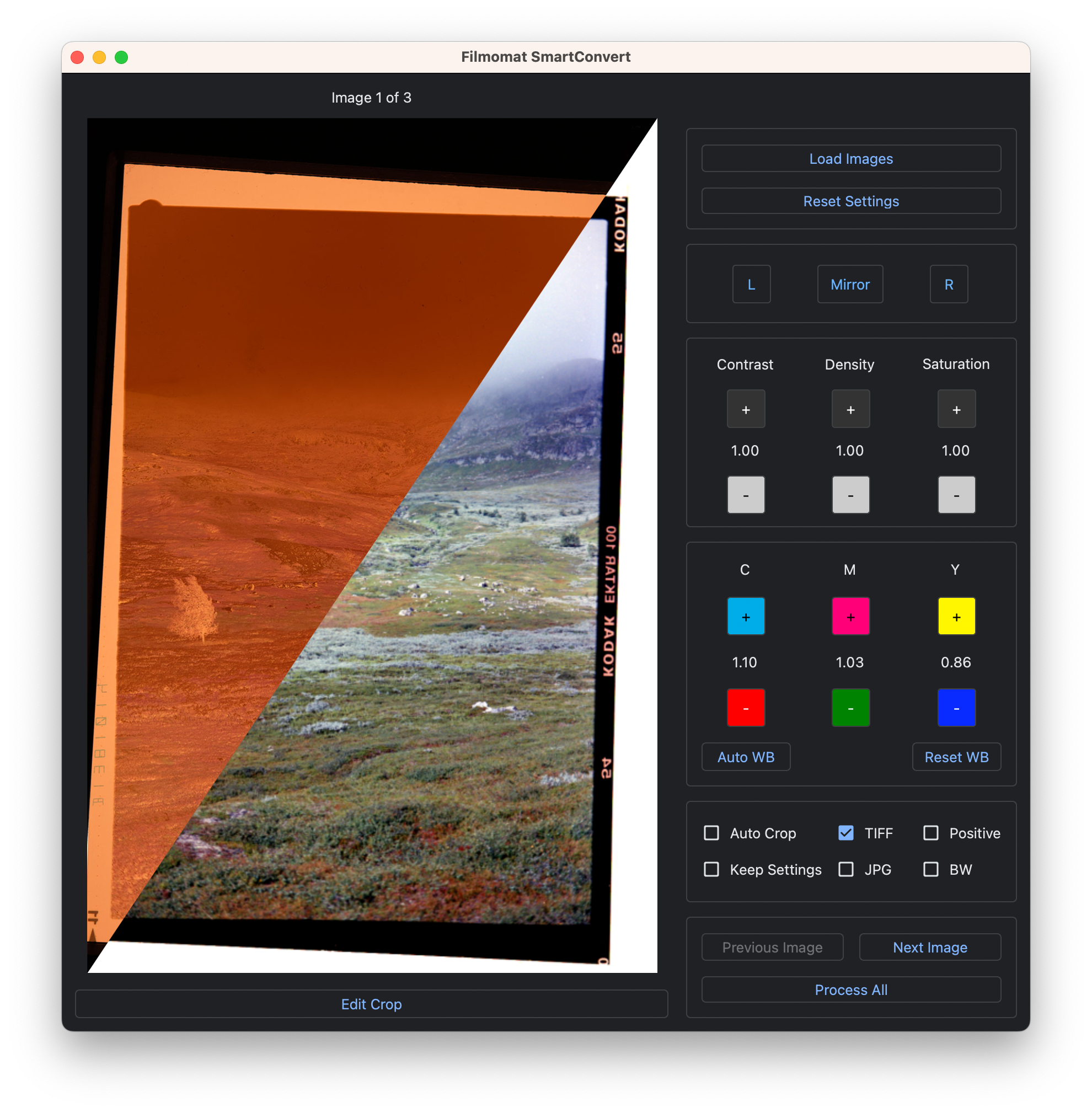
The AutoCrop tool automatically detects the film image and applies an appropriate crop and tilt to the image. Of course, you can also adjust the crop manually.
White Balance Control
With SmartConvert, you have three intuitive ways to adjust the colors of your image: Apply automatic white balance (default), adjust colors using the CMY buttons – or simply click on a gray area in the image to set the white balance!
Flat Field Correction
All camera lenses show more or less pronounced vignetting at the edges. This can interfere with camera scanning, especially in the shadow areas of negatives. With SmartConvert's integrated flat-field correction function, you can easily remove this effect. Simply upload a simple image of your light source (without film) and SmartConvert will remove the vignetting from your scanned images.
DEMO Download
Test SmartConvert for free before purchasing.
The demo version shows a watermark in the preview and in the exported image.
> DEMO Download Windows Version
Limited Right of Withdrawal
Please note:
When the software is delivered via download link, a personalized license key is created. The 14-day right of withdrawal therefore expires prematurely upon receipt of the software.
--> Please use the provided demo version for testing.
Product Safety Information
Manufacturer:
Filmomat GmbH
Frohschammerstrasse 14
80807 Munich
info@filmomat.eu
Your legal guarantee rights

Thank you for submitting your form!
We appreciate your interest and will review your information as soon as possible.
Our team is dedicated to providing excellent customer service, and we will do our best to respond promptly.
Choose options
Tax included. Shipping calculated at checkout
Negative conversion made easy.
For color, black and white, negatives, and slides.
- Standalone tool – no additional software required.
- No subscription. Buy once, use unlimited. Updates included.
- Full user license (Windows 8 or newer, macOS 11 or newer)
After purchase, you will receive a download link for the software and a separate email with your personal license key for activation.
By purchasing the software, you agree that we may transmit your data (email address) to the manufacturer for the activation of your user license.
This is a single-user license. You may use the license on up to 4 personal devices. Sharing the license with other users is prohibited.
Feel free to test the software in the demo version before ordering.
Workflow
Inspired by the efficiency of industrial film scanners like the Fuji Frontier, SmartConvert is designed for simplicity and performance. Effortlessly transform your (DSLR) scanned negatives into stunning positives.
Clever keyboard shortcuts and the absence of unnecessary frills enable a fast workflow.
SmartConvert focuses on the essentials, offering a seamless experience that mirrors the precision of professional film scanning.
Our tip: The Smart Convert Control Panel
Almost all SmartConvert functions can be adjusted via convenient keyboard shortcuts. This significantly increases the efficiency of your workflow and allows you to quickly process a large number of images in the shortest possible time. In addition, we have developed the SmartConvert Control Panel, a hardware keyboard specially designed for SmartConvert. This allows you to control all SmartConvert functions via a physical keyboard – just like with a professional film scanner!
Features
The Algorithm
SmartConvert processes all common RAW file types and TIFF images – in color and black and white.
The processing algorithm is designed to preserve the essence of the film and avoid any artificial image manipulation.
No LUTs, no effects, no attempt to emulate a specific "look."
Simply a powerful tool for easy and quick conversion of your negatives (or slides).
Hot Folder Feature
Specify a hot folder, and all images stored in it will be automatically imported into SmartConvert. Use this function to connect a camera directly to SmartConvert! Simply use a tethering software of your choice to transfer images from the camera to the hot folder.
Auto-Crop
No more manual cropping!
The AutoCrop tool automatically detects the film image and applies an appropriate crop and tilt to the image. Of course, you can also adjust the crop manually.
White Balance Control
With SmartConvert, you have three intuitive ways to adjust the colors of your image: Apply automatic white balance (default), adjust colors using the CMY buttons – or simply click on a gray area in the image to set the white balance!
Flat Field Correction
All camera lenses show more or less pronounced vignetting at the edges. This can interfere with camera scanning, especially in the shadow areas of negatives. With SmartConvert's integrated flat-field correction function, you can easily remove this effect. Simply upload a simple image of your light source (without film) and SmartConvert will remove the vignetting from your scanned images.
DEMO Download
Test SmartConvert for free before purchasing.
The demo version shows a watermark in the preview and in the exported image.
> DEMO Download Windows Version
Limited Right of Withdrawal
Please note:
When the software is delivered via download link, a personalized license key is created. The 14-day right of withdrawal therefore expires prematurely upon receipt of the software.
--> Please use the provided demo version for testing.
Product Safety Information
Manufacturer:
Filmomat GmbH
Frohschammerstrasse 14
80807 Munich
info@filmomat.eu
Your legal guarantee rights
Thank you for submitting your form!
We appreciate your interest and will review your information as soon as possible.
Our team is dedicated to providing excellent customer service, and we will do our best to respond promptly.
If you have any questions or concerns, please do not hesitate to contact us.
Best shipping
We ship your goods as quickly and safely as possible.
We process your payment information and other data securely.